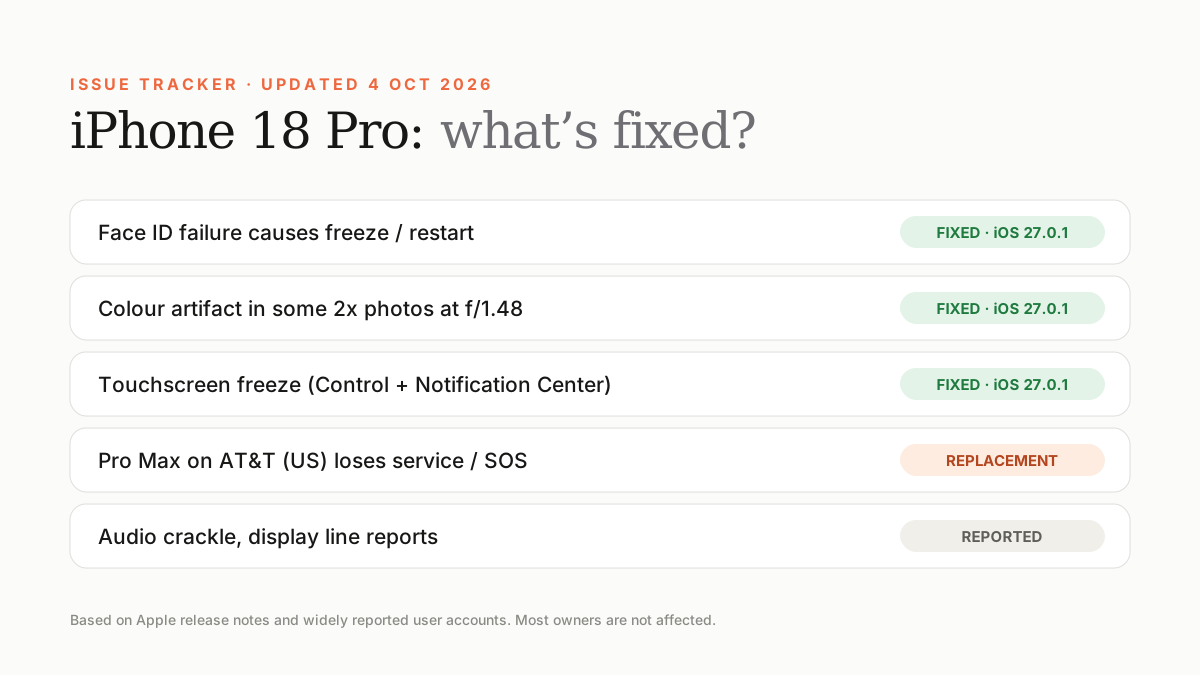
Apple hasn't acknowledged it, and iOS 27.0.1 didn't fix it. Some owners heard the same noise on replacement phones, which points to software. Restart, switch Mic Mode to Standard, and book diagnostics if it continues.
Since launch week, some iPhone 18 Pro and Pro Max owners have reported a crackle, pop or click from the earpiece speaker. It's the most persistent unresolved complaint of this generation.
When it happens
- When a notification arrives.
- When the keyboard appears.
- During phone calls.
- When toggling Airplane Mode.
- Sometimes when changing brightness quickly.
Hardware or software?
Reports are mixed. Several owners who swapped their phone heard the same noise on the new unit, which suggests a software cause. Others report the noise stopped after a full power-off. Apple hasn't named a cause or announced a repair programme as of late October 2026.
Things to try
- Update to the latest iOS in Settings › General › Software Update.
- Power the phone off fully, wait 30 seconds and turn it back on.
- During a call, open Control Center, tap Mic Mode and choose Standard instead of Voice Isolation.
- Remove any case or screen protector that touches the earpiece grille.
- Test with Bluetooth off to rule out an accessory.
When to book a repair
If the noise is loud, constant, or also comes from the bottom speaker during media playback, book Apple diagnostics. Even if no fix is offered, the fault is recorded while you're in warranty.
Frequently asked questions
Is the iPhone 18 Pro speaker crackle fixed?
Not as of late October 2026. iOS 27.0.1 didn't address it.
Does a replacement fix the crackle?
Not always. Some owners report the same noise on replacement units.
Sources
- tech-ish: Every iPhone 18 Pro problem and which are fixed
- iDrop News: iPhone 18 Pro speaker crackling reports
- The Mac Observer: iPhone 18 Pro speaker crackling bugs
Find Next Phone is an independent retailer. Apple, iPhone and iOS are trademarks of Apple Inc. Illustrations are our own and are not Apple product images.